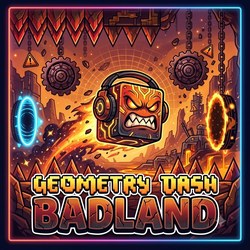
Enter a world of sharp obstacles, dramatic transitions, and rhythm-driven action in Geometry Dash Badland. This Geometry Dash-style platformer challenges you to guide your icon through a demanding course where every jump, flight, and movement change requires careful timing.
The experience goes beyond basic cube jumping. Depending on the version, you may switch between several movement modes, navigate gravity-changing portals, and tackle sections that demand quick reactions. Learning how each mechanic works is the key to making steady progress.
What Is Geometry Dash Badland?
Geometry Dash Badland is a browser-playable platforming challenge inspired by the fast-paced gameplay of Geometry Dash. Several games and adaptations use the Badland name, so their levels, difficulty, and additional features may differ.
Some versions focus on completing a challenging obstacle course, while others include an editor that lets players experiment with blocks, hazards, and gameplay elements.
The central objective is familiar: move through the level, avoid collisions, and reach the finish. The challenge comes from recognizing obstacle patterns and adapting whenever the gameplay changes.
Explore Its Challenging Gameplay
Geometry Dash Badland combines precise movement with a variety of possible gameplay modes. Depending on the version, the course may feature:
Cube sections: Jump over spikes and gaps while landing safely on platforms.
Ship sections: Control upward and downward movement through narrow spaces.
Ball sections: Switch gravity to move between surfaces.
UFO sections: Use separate taps to navigate obstacles.
Wave sections: Alternate between diagonal upward and downward movement.
Robot sections: Time jumps carefully to clear obstacles and reach safe platforms.
Portal transitions: Adapt to changes in movement, gravity, size, or speed.
The challenge is not just reacting quickly. You must understand how each mode responds to your input and prepare for the next obstacle before reaching it.
How to Play Geometry Dash Badland
Your objective is to guide your icon through the course without touching spikes, blocks, or other hazards. The level generally scrolls forward automatically, so your attention should stay on movement and timing.
Controls
Common controls in browser versions include:
Spacebar: Jump or activate the current movement action.
Up Arrow: Jump or perform the primary action.
W key: Control movement in versions that support it.
Left Mouse Button: Jump, activate orbs, or control flight.
Touchscreen Tap: Play on supported mobile devices.
In Ship mode, holding an input makes the icon rise, while releasing it allows the icon to descend. In UFO mode, separate taps produce individual hops. Wave mode uses holding and releasing to change the direction of diagonal movement.
Controls and optional shortcuts can vary by version, so follow the instructions displayed in your game.
Tips for Beating Difficult Sections
1. Learn the obstacle sequence.
Watch for repeated patterns of spikes, gaps, and platforms. Recognizing what comes next gives you more time to prepare your input.
2. Pay attention to portals.
A portal may change your movement mode or gravity. Look for these transitions and be ready to adjust immediately.
3. Keep flight movements controlled.
In Ship sections, small adjustments can help you remain inside narrow corridors. Avoid holding the control longer than necessary.
4. Practice each movement mode.
Cube, Ball, UFO, Ship, and Wave all behave differently. Focus on understanding one mechanic at a time instead of treating every section the same way.
5. Use Practice Mode if available.
Some versions of the original Geometry Dash experience include checkpoints through Practice Mode. These can help you learn difficult sequences without restarting the entire level after every mistake.
6. Prioritize consistency over speed.
Random inputs make precise sections harder. Aim to reproduce the correct timing each time you encounter a familiar pattern.
What Makes Geometry Dash Badland Interesting?
Geometry Dash Badland appeals to players who enjoy platforming challenges that combine multiple mechanics.
Varied movement: Different forms require different control techniques.
Rhythm-based action: Music and obstacle placement create a strong sense of timing.
Portal mechanics: Transitions keep the course from relying on a single movement pattern.
Replay value: Repeated attempts help you learn the route and improve your consistency.
Optional creative features: Certain browser adaptations include a level editor for building and experimenting with custom layouts.
Not every version includes all these features. Check the game's menu or on-screen instructions to see which mechanics are available in your build.
More Geometry Dash Games to Explore
Ready for another geometric obstacle challenge? Try these titles on BloodbathGD:
Geometry Dash Classic – Practice precise jumps and learn the fundamentals of rhythm platforming.
Hyper Wave Trial – Focus on Wave control and accurate movement through tight passages.
Each game offers a different way to practice timing, recognize hazards, and improve your platforming skills.
Start Your Geometry Dash Badland Challenge
Geometry Dash Badland combines challenging obstacles, changing movement modes, and rhythm-driven action in one engaging platforming experience. Learn the controls, watch for portals, and approach difficult sections with patience.
Every attempt helps you understand the course a little better. Keep your movements controlled and work toward a clean run.
Play Geometry Dash Badland online for free and test your timing, focus, and reflexes!
Geometry Dash Badland FAQ
Can I play Geometry Dash Badland online for free?
Yes. You can play Geometry Dash Badland online for free on bloodbathgd.games without downloading an app or installer.
How do I play Geometry Dash Badland?
Use the game controls shown in the browser and focus on timing your jumps, movements, and rhythm through each obstacle.
Does Geometry Dash Badland work on mobile?
The game page automatically checks device support. If a game is limited to PC or mobile, the page will show a clear notice.
What games are similar to Geometry Dash Badland?
You can find related Geometry Dash-style games on this page and explore more categories such as Hot, Popular, Easy, Hard, Insane, and Demon.






 Hot
Hot Popular
Geometry Dash Badland – Play Online for Free
Enter a world of sharp obstacles, dramatic transitions, and rhythm-driven action in Geometry Dash Badland. This Geometry Dash-style platformer challenges you to guide your icon through a demanding course where every jump, flight, and movement change requires careful timing.
The experience goes beyond basic cube jumping. Depending on the version, you may switch between several movement modes, navigate gravity-changing portals, and tackle sections that demand quick reactions. Learning how each mechanic works is the key to making steady progress.
What Is Geometry Dash Badland?
Geometry Dash Badland is a browser-playable platforming challenge inspired by the fast-paced gameplay of Geometry Dash. Several games and adaptations use the Badland name, so their levels, difficulty, and additional features may differ.
Some versions focus on completing a challenging obstacle course, while others include an editor that lets players experiment with blocks, hazards, and gameplay elements.
The central objective is familiar: move through the level, avoid collisions, and reach the finish. The challenge comes from recognizing obstacle patterns and adapting whenever the gameplay changes.
Explore Its Challenging Gameplay
Geometry Dash Badland combines precise movement with a variety of possible gameplay modes. Depending on the version, the course may feature:
The challenge is not just reacting quickly. You must understand how each mode responds to your input and prepare for the next obstacle before reaching it.
How to Play Geometry Dash Badland
Your objective is to guide your icon through the course without touching spikes, blocks, or other hazards. The level generally scrolls forward automatically, so your attention should stay on movement and timing.
Controls
Common controls in browser versions include:
In Ship mode, holding an input makes the icon rise, while releasing it allows the icon to descend. In UFO mode, separate taps produce individual hops. Wave mode uses holding and releasing to change the direction of diagonal movement.
Controls and optional shortcuts can vary by version, so follow the instructions displayed in your game.
Tips for Beating Difficult Sections
1. Learn the obstacle sequence.
Watch for repeated patterns of spikes, gaps, and platforms. Recognizing what comes next gives you more time to prepare your input.
2. Pay attention to portals.
A portal may change your movement mode or gravity. Look for these transitions and be ready to adjust immediately.
3. Keep flight movements controlled.
In Ship sections, small adjustments can help you remain inside narrow corridors. Avoid holding the control longer than necessary.
4. Practice each movement mode.
Cube, Ball, UFO, Ship, and Wave all behave differently. Focus on understanding one mechanic at a time instead of treating every section the same way.
5. Use Practice Mode if available.
Some versions of the original Geometry Dash experience include checkpoints through Practice Mode. These can help you learn difficult sequences without restarting the entire level after every mistake.
6. Prioritize consistency over speed.
Random inputs make precise sections harder. Aim to reproduce the correct timing each time you encounter a familiar pattern.
What Makes Geometry Dash Badland Interesting?
Geometry Dash Badland appeals to players who enjoy platforming challenges that combine multiple mechanics.
Not every version includes all these features. Check the game's menu or on-screen instructions to see which mechanics are available in your build.
More Geometry Dash Games to Explore
Ready for another geometric obstacle challenge? Try these titles on BloodbathGD:
Each game offers a different way to practice timing, recognize hazards, and improve your platforming skills.
Start Your Geometry Dash Badland Challenge
Geometry Dash Badland combines challenging obstacles, changing movement modes, and rhythm-driven action in one engaging platforming experience. Learn the controls, watch for portals, and approach difficult sections with patience.
Every attempt helps you understand the course a little better. Keep your movements controlled and work toward a clean run.
Play Geometry Dash Badland online for free and test your timing, focus, and reflexes!
Geometry Dash Badland FAQ
Can I play Geometry Dash Badland online for free?
Yes. You can play Geometry Dash Badland online for free on bloodbathgd.games without downloading an app or installer.
How do I play Geometry Dash Badland?
Use the game controls shown in the browser and focus on timing your jumps, movements, and rhythm through each obstacle.
Does Geometry Dash Badland work on mobile?
The game page automatically checks device support. If a game is limited to PC or mobile, the page will show a clear notice.
What games are similar to Geometry Dash Badland?
You can find related Geometry Dash-style games on this page and explore more categories such as Hot, Popular, Easy, Hard, Insane, and Demon.