Geometry Arrow 3D: Conquering the Extreme Demon Obstacle Course
Navigate the Neon Maze in 3D
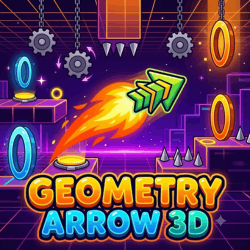
Geometry Arrow 3D puts a fresh spin on wave-style arcade gameplay. Control a fast-moving arrow as it travels through three-dimensional corridors packed with spikes, barriers, and narrow passages. The perspective adds an extra challenge, making it important to judge distances and react quickly.
The arrow moves forward automatically, so your main task is to control its vertical movement. One mistimed input can end your run, making precision and practice essential.
How to Play Geometry Arrow 3D
The controls are simple, but mastering them takes patience.
Left Mouse Button: Hold to move the arrow upward.
Spacebar or Up Arrow: Alternative controls in supported versions.
Release the button: Let the arrow move downward.
Mobile: Touch and hold the screen to rise, then release to descend.
Guide the arrow through every gap without touching walls, spikes, or other obstacles. Reach the end of the course to complete the challenge. <Cite refs={["turn945467search0","turn945467search1"]} />
Three Tricks for Better Control
Look ahead. Focus on the next opening rather than reacting only to the obstacle closest to you.
Use short inputs. Avoid holding the button longer than necessary when navigating tight corridors.
Learn from mistakes. Remember where your arrow hit an obstacle and adjust your timing on the next attempt.
Why Try the 3D Version?
The three-dimensional perspective makes familiar wave movement feel different. Narrow paths require more careful positioning, while quick turns challenge your reflexes. The combination of simple controls and demanding obstacle courses makes each successful run rewarding.
Ready for the Next Run?
Keep your movements controlled, watch the path ahead, and prepare for sudden turns. Play Geometry Arrow 3D now and see if you can reach the finish!
Mastering Course Mechanics and Input Timing
To achieve high completion percentages in Geometry Arrow 3D, understanding the rhythm of each input is paramount. Whether guiding your icon through high-velocity speed portals or timing frame-perfect hops across multi-spike hazards, consistency is the key. Focus on tapping lightly rather than pressing hard, which keeps your fingers nimble for rapid consecutive obstacles.
Take advantage of practice mode to isolate difficult transitions. Placing checkpoints before tight vehicle corridors allows you to build muscle memory without restarting from the beginning. Once the timing feels natural, switch back to normal mode and let the musical cues guide your execution.
Hazard Navigation and Obstacle Strategies
Obstacles in Geometry Arrow 3D are arranged to challenge your reaction speed and pattern recognition. Watch for deceptive platform gaps where jumping too early leads to collision with ceiling spikes. Maintaining a steady eye on the horizon ahead of your character provides the fractional second required to plan safe takeoff points.
Pro Tips for High-Level Consistency
Sight-Reading Discipline: Keep your eyes fixed on incoming obstacles rather than staring directly at your icon.
Rhythmic Muscle Memory: Internalize the soundtrack tempo to synchronize your taps with the bass beats and snare drops.
Buffer Jump Inputs: Hold down the jump key slightly before landing to launch immediately upon touching the ground.
Stay Relaxed: Physical tension leads to late inputs. Take short breaks between intense attempts to reset your focus.








 Hot
Hot Popular
Geometry Arrow 3D: Conquering the Extreme Demon Obstacle Course
Navigate the Neon Maze in 3D
Geometry Arrow 3D puts a fresh spin on wave-style arcade gameplay. Control a fast-moving arrow as it travels through three-dimensional corridors packed with spikes, barriers, and narrow passages. The perspective adds an extra challenge, making it important to judge distances and react quickly.
The arrow moves forward automatically, so your main task is to control its vertical movement. One mistimed input can end your run, making precision and practice essential.
How to Play Geometry Arrow 3D
The controls are simple, but mastering them takes patience.
Guide the arrow through every gap without touching walls, spikes, or other obstacles. Reach the end of the course to complete the challenge. <Cite refs={["turn945467search0","turn945467search1"]} />
Three Tricks for Better Control
Look ahead. Focus on the next opening rather than reacting only to the obstacle closest to you.
Use short inputs. Avoid holding the button longer than necessary when navigating tight corridors.
Learn from mistakes. Remember where your arrow hit an obstacle and adjust your timing on the next attempt.
Why Try the 3D Version?
The three-dimensional perspective makes familiar wave movement feel different. Narrow paths require more careful positioning, while quick turns challenge your reflexes. The combination of simple controls and demanding obstacle courses makes each successful run rewarding.
Ready for the Next Run?
Keep your movements controlled, watch the path ahead, and prepare for sudden turns. Play Geometry Arrow 3D now and see if you can reach the finish!
Mastering Course Mechanics and Input Timing
To achieve high completion percentages in Geometry Arrow 3D, understanding the rhythm of each input is paramount. Whether guiding your icon through high-velocity speed portals or timing frame-perfect hops across multi-spike hazards, consistency is the key. Focus on tapping lightly rather than pressing hard, which keeps your fingers nimble for rapid consecutive obstacles.
Take advantage of practice mode to isolate difficult transitions. Placing checkpoints before tight vehicle corridors allows you to build muscle memory without restarting from the beginning. Once the timing feels natural, switch back to normal mode and let the musical cues guide your execution.
Hazard Navigation and Obstacle Strategies
Obstacles in Geometry Arrow 3D are arranged to challenge your reaction speed and pattern recognition. Watch for deceptive platform gaps where jumping too early leads to collision with ceiling spikes. Maintaining a steady eye on the horizon ahead of your character provides the fractional second required to plan safe takeoff points.
Pro Tips for High-Level Consistency
Explore More Verified Titles on Bloodbath GD
If you enjoy the fast-paced platforming in Geometry Arrow 3D, be sure to check out other exciting titles on Bloodbath GD. Test your precision with Geometry Dash 2.2 or push your reflexes in Geometry Neon Dash Rainbow.
Geometry Arrow 3D FAQ
Can I play Geometry Arrow 3D online for free?
Yes. You can play Geometry Arrow 3D online for free on bloodbathgd.games without downloading an app or installer.
How do I play Geometry Arrow 3D?
Use the game controls shown in the browser and focus on timing your jumps, movements, and rhythm through each obstacle.
Does Geometry Arrow 3D work on mobile?
The game page automatically checks device support. If a game is limited to PC or mobile, the page will show a clear notice.
What games are similar to Geometry Arrow 3D?
You can find related Geometry Dash-style games on this page and explore more categories such as Hot, Popular, Easy, Hard, Insane, and Demon.